In an attemp to get back in the mobile electronics game, aol decided to enter (the already crowded) game of daily news. Note, the daily nebraskan has been a part of this game for years. If you have ever used the flip board app for iPad then you know how sweet it is. For those who don't know, flip board basically takes daily news and puts it into a more eye friendly format. Aol does the same thing with what it calls editions but it makes it even more user based. After downloading the app, the first thing it has you do is connect to facebook, twitter, and naturally aim. Once connected to all of these it has you select the content that you would like to see in your magazine and it even has you pick the colors that you want the color of your daily magazines to be. After going through the initial process, a magazine is delivered to your iPad daily with exactly the content you want on it. Best part, it's free!
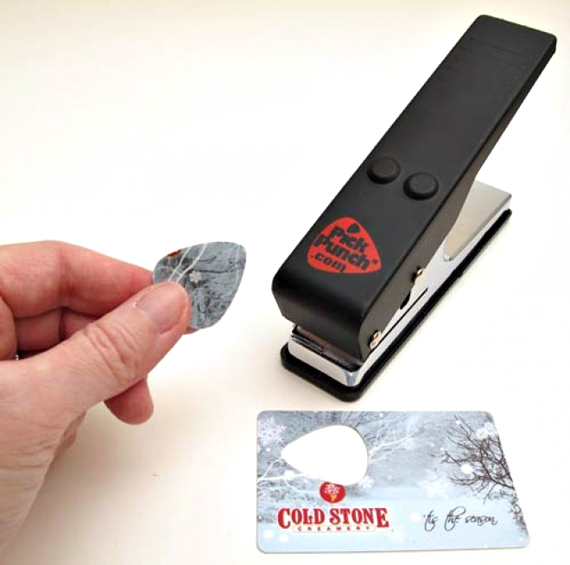
Every guy picks up a guitar for the first time with the sole purpose of getting girls. It starts in a dorm room somewhere, as you awkwardly try to make your way through Stairway to Heaven, and, for those with enough determination, it ends on a huge stage with scores women waiting for you to finish your set. Whether you’re a pro or you’re still putting calluses on your fingertips, you’re most likely going through bucket-loads of picks. With the Pick Punch, you’ve got a new pick waiting for you just about anywhere. The Pick Punch looks like a hole punch, but instead of punching little tiny holes in loose-leaf that somehow wind up all over your clothes, it punches new guitar picks. Old bus pass? That’s a pick. Soda bottle? That’s a pick too. Shoe-obsessed girlfriend’s credit card? Definite pick. $25
Talk about your cross promotions. The Rinderknecht-built Rinspeed BamBoo concept electric car looks to be the stuff of a gadget nerd's dreams. Unfortunately, that dream resembles a dystopian nightmare envisioned by a Neal Stephenson novel whereby everything we own is sponsored, trivial, and slathered in corporate logos. But hey, it's just a concept, and production vehicles never look like the original idea so anything goes... and we mean anything. To start with, the breadbox-inspired dash features a Siemens VDO display with a docking station in the glovebox for the new HTC Flyer tablet. The BamBoo dash is flanked by flowery JBL GreenEdge speakers and the starter key is styled after a Swiss army knife. And if we're not mistaken, there's a webcam extended off a stalk from the center of the dash. An interesting piece of work right on down to the cluster of old school throw switches for the wipers, lights, hazards, etc. But that's just the cockpit.
The radiator grill has been replaced by an internet-connected "identiface," developed by Daimler subsidiary MBtech, whereby the occupant can display any number of messages to onlookers from Facebook or Twitter, for example, or even the radio station preset you're currently jamming. The inflatable rear seats are removable as is the inflatable waterproof roof developed by Tecnotex that doubles as a beach blanket. The whole kit is powered by a 54 kW electric motor capable of a 120km/h top speed and battery capable of pushing the sporty golf cart some 105 kilometers before requiring a recharge from an RWE intelligent charging station. Look for it to make its big reveal at the Geneva Motor Show. Until then, head over to Autoblog to feast on their gallery of images with a few choice shots added below.
With its aluminum curves and sleek design, your MacBook Pro deserves a carrying case as stylish as it is. The Blackbox Case ($130) fits the bill, with solid oak construction made specifically for your 13- or 15-inch MBP, felt interior lining for added protection, and a simple strap closure. Even better, 15% of the purchase price goes to charity, which should help you to feel better when the case's beauty draws looks of jealousy from PC users.
It's hard to believe we're already writing a review of the Nook Color, considering Barnes & Noble's first foray into the e-reader world was revealed just over a year ago. In that time, the company has gone from no presence in e-books to owning 20 percent of the marketshare, and now has moved from a somewhat sluggish hybrid E-Ink / LCD device to a full color, tablet-like product. The Nook Color is definitely a major step forward, boasting a completely revamped, Android-based OS, and a big push into the children's book and periodical market (particularly full color magazines). Both of these spaces have yet to be mined successfully by players like Apple and Amazon -- and it's clear Barnes & Noble is aware of the stakes. Beyond book reading, the Nook Color potentially offers a tablet alternative that can (or will be able to) do much of what is possible on an iPad or Galaxy Tab. In fact, the company plans to launch its own Android tablet app store in the first quarter of 2011, providing a consistent, compatible application experience that could get the jump on other Android tablet-makers' plans (hello Samsung). Of course, this is a fierce market, and with a $249 price tag, Barnes & Noble has to play to win on every front. So, is the Nook Color the next logical step in e-readers? Is it a healthy alternative to more expensive tablets? And can it cement the prominent bookseller's place in a hotly contested new space? Read on for all those answers in the full Engadget review!It should be obvious right off the bat that B&N put a lot of thought into the design of the new Nook. In fact, the actual industrial design of the device was done by Yves Behar, whose work you've undoubtedly seen in iconic products like the OLPC XO laptop, the Leaf Light for Herman Miller, and more recently, the intriguing Jambox. There's no mistaking his masterful touch here; the Nook Color is an elegantly, thoughtfully designed piece of technology. As you would expect, the front of the device is eaten up mostly with that 7-inch, 1024 x 600 IPS display. The edges and sides of the device are coated in a near-matte finish, charcoal-colored plastic, while the back of the unit is smooth, soft rubber. On the lower lefthand corner there's a small "hook" which continues the outline of the unit, but gives purchase for a finger to slip through, or a lanyard to be attached. It's a small design flair without a lot of use, but it helps to give the Color a distinct vibe. On the opposite sides near the top of the device there's a power / sleep button and volume rocker. A 3.5mm headphone jack lives on top of the unit, there's a speaker around back, and on the face of the device is a single, iPhone-like home "n" button which always takes you back to a familiar homescreen. At just 0.48-inches thick, the Nook Color feels svelte, though it weighs in at nearly a pound, making the device seems substantial in your hands.
Even though the framing is built out of plastic, the unit feels durable and even rugged (we suspect that rubber backing helps with that perception. While we didn't do any drop tests, the Nook Color certainly feels like it can take something of a beating (but don't go throwing it against walls on our account).
Inside, the system boasts a TI OMAP 3621 CPU clocked at 800MHz (or, "speeds up to 800MHz"). The device has 512MB of RAM, 8GB of flash storage, and a microSD slot for additional expansion (the slot allows use of cards up to 32GB). As we said, the screen is of the 7-inch LCD variety, and at the 1024 x 600 resolution, looks reasonably dense (from a pixel perspective) with a 178-degree viewing angle. Barnes & Noble is particularly proud of the screen, which the company says utilizes its "VividView" treatment to provide less glare. What that really means is that the screen coating is fully laminated against the display itself, making for less tiny, almost-imperceptible unglued areas which can catch light. Still, the display is pretty reflective, making reading in bright locations (like on a subway with stark fluorescent lighting) sometimes difficult.
The Nook Color is equipped with 802.11b/g/n WiFi, but you won't find any 3G here. Additionally, there's a light sensor on the front of the device -- a nice touch which allows you to conserve a little bit more of that battery (which is rated at 8 hours a charge... with WiFi off).
Overall, both inside and out, the Nook Color is surprisingly well designed. There are some performance issues (more on that in the software section below), but that seems likely to be a symptom of sloppy code rather than an underpowered chipset. In fact, we played around with a dev unit running Angry Birds, and it was just as smooth as the iPad or Galaxy Tab running the same game.Really, the Nook Color (and any device which relies solely on a touchscreen for input) is all about the software. The Color starts at a deficit (in our opinion) by running atop a custom Android build based off of version 2.1. That's a little bit of a downer as 2.2 provided a noticeable speed bump for the platform, and we're currently on the precipice of entering 2.3 territory, leaving Barnes & Noble considerably behind the curve. In many ways, this isn't really an issue, because the original Android interface has been so obscured by the tweaked skin and functionality that using the Nook Color often feels nothing like Android -- and that's a good thing in this case. In fact, throw out your whole conception of Android as a platform (provided you have one at all), because the Color behaves like a beast all its own.
When you first boot the device, you're greeted with the center screen of three homescreens where you can arrange books and periodicals you're currently reading, see recently downloaded content (presented as a scrollable list at the bottom of the display), and get quick access to a number of other features of the device, such as your most recent selections, and general settings. We like the idea of this landing page, and in execution it works really well, though there are some touch response and frame rate issues that make the experience a little uneven. One nice feature is that you're able to scale and freely move material you're reading around these pages, allowing you to prioritize your content in a visual manner.
As far as general navigation goes, on every screen (not just your home base), you've got a small tab which pulls up a menu from the bottom of the page with familiar Nook selections: library, shop, search, extras, web, and settings.
The library section is organized by books, magazines, and newspapers, but also gives options for creating your own sets of content ("my shelves"), working with PDFs and other docs, music, images, and video (M4V only) in "my files," and allows you to dive into the company's much-touted lending program. The lending options have been expanded in the Nook Color, and the company now provides a social network of sorts for friends of yours with Nook devices wherein you see the selections they're lending out, showcase what you have to lend, and request titles. Not every book is lendable, but the expansions to the service are thoughtful.
Shopping is now a much more interactive and enjoyable experience, with clearly guided methods of search and discovery. We wish we could be as excited about file management, but it's kind of a mixed bag. We had no trouble playing MP3s and AAC files, but we had some issues figuring out just how to get our music into the player. We could play a single file, but found no option to add albums or create playlists. Finally, we figured out that a restart is required once you've added music (we're guessing it gives the device a chance to scan the content). That's all well and good, but the Color should rescan your collection after a USB sync. Another issue was getting back to the player itself. In the corner of the device you get a small music icon which gives you a pop-over notification -- you expect that it will transport you back to the player, but it does nothing. We also discovered while shooting our demo video that Pandora and the music app can actually end up playing over one another -- obviously there should be a call to kill one when another starts. Hopefully Barnes & Noble will have a quick fix for some of these minor issues early on.
Videos were another issue -- we couldn't get anything besides M4Vs to play, and even then we had trouble with some HD trailers. Obviously this isn't a crucial task for this device, but having a strong set of codecs and some decent video support would be really nice (and should cost next to nothing for this platform).
Dealing with galleries and PDFs, on the other hand, was a joy. We jumped into really large PDFs with no trouble whatsoever (though it is weird that you don't flip through them like books, rather swipe up and down). Galleries loaded up reasonably quickly and the included image viewer gives you a healthy amount of options (along with pinch zooming). The Nook Color also does Microsoft Office documents, and we were able to view DOCs and PPT files with a reasonable level of success. Just like most things on the device, it wasn't the fastest experience in the world, but it worked well.While the Nook Color is a fully capable Android tablet, it's not loaded with the kind of features you'll see in a Galaxy Tab. It does, however, have a full web browser, as well as a Pandora app, along with chess, sudoku, and crossword games. As we said earlier, Barnes & Noble has plans to launch its own app store in Q1 of 2011 with software designed (or tweaked) specifically for this form factor -- we're hoping that developers get on board, otherwise the Color-as-tablet concept is basically out the window. We do think that if anyone is going to force an Android tablet-specific app store, a retailer with a big footprint like B&N has more of a fighting chance right now than a disparate group of hardware manufacturers like Samsung and LG.
As far as the web browser goes, the experience is pretty standard Android 2.1 fare, though as with the homescreen and general navigation on the Nook Color, the fun of using the device is hampered by touch response and refresh rates that seem way behind the curve. The team working on this software really needs to clear up some of these lag issues to make the Color a more viable choice for those considering this instead of a dedicated Android tablet. Of course, this price point helps to make a powerful argument.
Web browsers and gaming aside, the main focus of the Nook Color is that it's an e-reader -- so how does it fare in that department?
First let's get something out of the way. Obviously this isn't an E-Ink screen, so you have to decide if you're on board or not for reading on an LCD display. If you're entertaining an iPad or Galaxy Tab, we'll assume this screen technology is not going to deter you from using the device as a reader. For us, the display tech isn't a major hang-up -- in fact, lots of the staff have been using iPads as reading devices with little to no trouble.
So as far as screen tech goes, the Nook Color looks gorgeous as an e-reader for standard books and goes one step beyond, delivering magazines and children's books the way they were meant to be viewed. For standard e-book reading, there are tons of options for formatting, fonts, and coloring -- even those with poor eyesight should be able to find settings that make the reading experience enjoyable. We really liked reading with the Color, and even though the device doesn't sport animated page turns (a la the iPad), it does offer great options for notation and word or phrase discovery (you can do dictionary, Google, and Wikipedia searches right from a contextual menu). We also loved that you're able to share quotes or info about what you're reading via email, Twitter, or Facebook.For magazines, the reading format is a bit different. The full pages of the magazine are displayed on the screen, and you can swipe left and right to move through them. What's even better, however, is a scrubber (for lack of a better term) that you're able to bring up just below your magazine content which lets you quickly jump through the magazine and then zoom into a page you want to read. We found this option great for skipping ads. Once in a magazine page, you can zoom and pan to see photos up close or read, but the Nook Color also provides a novel (no pun intended) option called ArticleView which lets you break out text on the page into a strip down the middle of the screen with plain, clearly readable content inside. It's a great idea that worked most of the time. Sometimes, on pages with lots of captions or cutaway text it didn't seem to capture everything. As avid magazine readers, we really love the option of a unified method of getting periodicals, and the Nook Color is the first device to actually show that it can be done without a tremendous amount of effort (and surprisingly little lost). There's clearly room to grow in this area (and a lot of content still to nab -- the current magazine catalog is only about 70 strong), but we like where it's headed. We hate to beat a dead horse, but as with the rest of the interface, the magazine experience is hampered by the sluggishness of the UI. The Nook Color also offers newspapers delivered daily, but we're not quite as psyched on the layout of the traditional dailies. We found the page ordering and design of these digital editions confusing and clunky. There's likely a hybrid of what Barnes & Noble is doing with magazines and what the company does with books for these publications -- but the current state of daily papers is a bit of a mess on the platform.
The final piece of the puzzle is B&N's push into the kids' book market with its new formatting that not only allows children and their parents to page through full color versions of popular kids titles, but introduces a "read to me" function. The premise is rather simple: a professional voice actor reads the copy out loud through the Nook Color's speaker, and a child can follow along. We're sure this will be a quality addition to a parent's arsenal of options for keeping the kids happy. We did have a few issues with some audio skipping early on in one of the books we tested, but it went away quickly and didn't return. The kids books also offer a scrubber similar to the one found in the magazine section. One thing of note -- loading these volumes takes a little more time -- though overall the feature worked as advertised.
Battery life
We didn't have much of a chance to gauge the Nook Color's long-term battery life (we've only had the device a few days), but in our testing, a full charge yielding more than a day of on and off use. This wasn't constant hammering, but an ebbing and flowing of reading, testing features, and keeping the device asleep. From the looks of things, a charge every couple of days should take care of battery issues for most people, but the most voracious readers may find that the Color pales in comparison to E-Ink devices, and in our testing the iPad still outclasses this in battery life by a long shot. In short: the battery life is good, but it's not going to blow you away. Expect to keep the charger handy -- you'll definitely need it on a regular basis.So, is the Nook Color worth your hard-earned cash? Well, we'll say this -- if you're a hardcore reader with an appetite that extends beyond books to magazines and newspapers, the Color is the first viable option we've seen that can support your habit. Not only does Barnes & Noble have an astoundingly good selection of e-book titles, the company seems to be aggressively pursuing the periodical business, which is a big deal. This is the first device we've seen that effectively and consistently presents a color magazine option. It's not the fanciest or most sophisticated presentation, but the idea of having your favorite glossy delivered direct to a device like this every month (in a truly readable format) is a major innovation. But besides all the reading you'll be doing with the Color, you're also buying into a potentially much bigger proposition -- namely, the idea that come Q1, this thing will be a viable Android tablet with an app store of its own. Granted, it doesn't have 3G on-board, and the OS could use some serious TLC and polish, but if B&N delivers on its desire to create a marketplace for Nook Color apps, you could be spending $249 not just for a great reading experience, but for something far bigger. For the price, you're getting a lot of product here -- now it's just a question of whether or not Barnes & Noble knows how to take advantage of that product.
You don’t have to be a gadget-savvy geek to appreciate the elegant simplicity of this faceless watch by Hiranao Tsubi – but it might help. It is minimalism at its best – a cross between classic digital displays and contemporary design. Turned off, this watch fades into the background – a simple metal bracelet. Turned on, the device becomes a digitial timepiece that simply displays the hour and minute.
Finally, there's a clean, safe and stylish bottle that is made from the practically inexhaustible resources of bamboo and glass. Bamboo gives our unique bottles style and strength. The glass guarantees safe, clean drinking at all temperatures, erasing the dangers of plastic water bottles. Whether you're chugging ice-cold water or sipping on steaming-hot tea, this uber-cool bottle is BPA-free, ensuring no chemicals leach into your drink. To clean your insulated bottle, simply unscrew the bottom and the easy-to-tote top to remove the dishwasher-safe glass. To help clean the planet, simply keep using your Bamboo Bottle to hydrate instead of bottled water.
The Bamboo Bottle Company prides itself on making safe water bottles. The glass insert, plastic top, nut and bottom are all dishwasher safe. The bamboo sleeve is not. Before microwaving, remove the bamboo and plastic components.
It's not like Apple could very well keep it a secret anymore, so today we're being treated to the official unveiling of the Magic Trackpad. This wireless touch input receptacle -- already thoroughly leaked, trademarked, and FCC-approved -- has just made its debut in, of all places, Apple's Store app for iOS 4. It's basically exactly what you'd expect: a glass-covered, aluminum-shelled replicator of the glorious multitouch experience on offer in Apple's MacBooks, only for the desktop. The Trackpad is battery-powered, communicates via Bluetooth fairy dust, and is ready to ship out right this minute for a dollar under 70 bucks.


 8/06/2011
 In an attemp to get back in the mobile electronics game, aol decided to enter (the already crowded) game of daily news. Note, the daily nebraskan has been a part of this game for years. If you have ever used the flip board app for iPad then you know how sweet it is. For those who don't know, flip board basically takes daily news and puts it into a more eye friendly format. Aol does the same thing with what it calls editions but it makes it even more user based. After downloading the app, the first thing it has you do is connect to facebook, twitter, and naturally aim. Once connected to all of these it has you select the content that you would like to see in your magazine and it even has you pick the colors that you want the color of your daily magazines to be. After going through the initial process, a magazine is delivered to your iPad daily with exactly the content you want on it. Best part, it's free!
 Posted in: gadgets
 Talk about your cross promotions. The Rinderknecht-built Rinspeed BamBoo concept electric car looks to be the stuff of a gadget nerd's dreams. Unfortunately, that dream resembles a dystopian nightmare envisioned by a Neal Stephenson novel whereby everything we own is sponsored, trivial, and slathered in corporate logos. But hey, it's just a concept, and production vehicles never look like the original idea so anything goes... and we mean anything. To start with, the breadbox-inspired dash features a Siemens VDO display with a docking station in the glovebox for the new HTC Flyer tablet. The BamBoo dash is flanked by flowery JBL GreenEdge speakers and the starter key is styled after a Swiss army knife. And if we're not mistaken, there's a webcam extended off a stalk from the center of the dash. An interesting piece of work right on down to the cluster of old school throw switches for the wipers, lights, hazards, etc. But that's just the cockpit.
  With its aluminum curves and sleek design, your MacBook Pro deserves a carrying case as stylish as it is. The Blackbox Case ($130) fits the bill, with solid oak construction made specifically for your 13- or 15-inch MBP, felt interior lining for added protection, and a simple strap closure. Even better, 15% of the purchase price goes to charity, which should help you to feel better when the case's beauty draws looks of jealousy from PC users.
 It's hard to believe we're already writing a review of the Nook Color, considering Barnes & Noble's first foray into the e-reader world was revealed just over a year ago. In that time, the company has gone from no presence in e-books to owning 20 percent of the marketshare, and now has moved from a somewhat sluggish hybrid E-Ink / LCD device to a full color, tablet-like product. The Nook Color is definitely a major step forward, boasting a completely revamped, Android-based OS, and a big push into the children's book and periodical market (particularly full color magazines). Both of these spaces have yet to be mined successfully by players like Apple and Amazon -- and it's clear Barnes & Noble is aware of the stakes. Beyond book reading, the Nook Color potentially offers a tablet alternative that can (or will be able to) do much of what is possible on an iPad or Galaxy Tab. In fact, the company plans to launch its own Android tablet app store in the first quarter of 2011, providing a consistent, compatible application experience that could get the jump on other Android tablet-makers' plans (hello Samsung). Of course, this is a fierce market, and with a $249 price tag, Barnes & Noble has to play to win on every front. So, is the Nook Color the next logical step in e-readers? Is it a healthy alternative to more expensive tablets? And can it cement the prominent bookseller's place in a hotly contested new space? Read on for all those answers in the full Engadget review!
 It should be obvious right off the bat that B&N put a lot of thought into the design of the new Nook. In fact, the actual industrial design of the device was done by Yves Behar, whose work you've undoubtedly seen in iconic products like the OLPC XO laptop, the Leaf Light for Herman Miller, and more recently, the intriguing Jambox. There's no mistaking his masterful touch here; the Nook Color is an elegantly, thoughtfully designed piece of technology. As you would expect, the front of the device is eaten up mostly with that 7-inch, 1024 x 600 IPS display. The edges and sides of the device are coated in a near-matte finish, charcoal-colored plastic, while the back of the unit is smooth, soft rubber. On the lower lefthand corner there's a small "hook" which continues the outline of the unit, but gives purchase for a finger to slip through, or a lanyard to be attached. It's a small design flair without a lot of use, but it helps to give the Color a distinct vibe. On the opposite sides near the top of the device there's a power / sleep button and volume rocker. A 3.5mm headphone jack lives on top of the unit, there's a speaker around back, and on the face of the device is a single, iPhone-like home "n" button which always takes you back to a familiar homescreen. At just 0.48-inches thick, the Nook Color feels svelte, though it weighs in at nearly a pound, making the device seems substantial in your hands.
 Really, the Nook Color (and any device which relies solely on a touchscreen for input) is all about the software. The Color starts at a deficit (in our opinion) by running atop a custom Android build based off of version 2.1. That's a little bit of a downer as 2.2 provided a noticeable speed bump for the platform, and we're currently on the precipice of entering 2.3 territory, leaving Barnes & Noble considerably behind the curve. In many ways, this isn't really an issue, because the original Android interface has been so obscured by the tweaked skin and functionality that using the Nook Color often feels nothing like Android -- and that's a good thing in this case. In fact, throw out your whole conception of Android as a platform (provided you have one at all), because the Color behaves like a beast all its own.
 While the Nook Color is a fully capable Android tablet, it's not loaded with the kind of features you'll see in a Galaxy Tab. It does, however, have a full web browser, as well as a Pandora app, along with chess, sudoku, and crossword games. As we said earlier, Barnes & Noble has plans to launch its own app store in Q1 of 2011 with software designed (or tweaked) specifically for this form factor -- we're hoping that developers get on board, otherwise the Color-as-tablet concept is basically out the window. We do think that if anyone is going to force an Android tablet-specific app store, a retailer with a big footprint like B&N has more of a fighting chance right now than a disparate group of hardware manufacturers like Samsung and LG.
 For magazines, the reading format is a bit different. The full pages of the magazine are displayed on the screen, and you can swipe left and right to move through them. What's even better, however, is a scrubber (for lack of a better term) that you're able to bring up just below your magazine content which lets you quickly jump through the magazine and then zoom into a page you want to read. We found this option great for skipping ads. Once in a magazine page, you can zoom and pan to see photos up close or read, but the Nook Color also provides a novel (no pun intended) option called ArticleView which lets you break out text on the page into a strip down the middle of the screen with plain, clearly readable content inside. It's a great idea that worked most of the time. Sometimes, on pages with lots of captions or cutaway text it didn't seem to capture everything. As avid magazine readers, we really love the option of a unified method of getting periodicals, and the Nook Color is the first device to actually show that it can be done without a tremendous amount of effort (and surprisingly little lost). There's clearly room to grow in this area (and a lot of content still to nab -- the current magazine catalog is only about 70 strong), but we like where it's headed. We hate to beat a dead horse, but as with the rest of the interface, the magazine experience is hampered by the sluggishness of the UI.
 So, is the Nook Color worth your hard-earned cash? Well, we'll say this -- if you're a hardcore reader with an appetite that extends beyond books to magazines and newspapers, the Color is the first viable option we've seen that can support your habit. Not only does Barnes & Noble have an astoundingly good selection of e-book titles, the company seems to be aggressively pursuing the periodical business, which is a big deal. This is the first device we've seen that effectively and consistently presents a color magazine option. It's not the fanciest or most sophisticated presentation, but the idea of having your favorite glossy delivered direct to a device like this every month (in a truly readable format) is a major innovation. But besides all the reading you'll be doing with the Color, you're also buying into a potentially much bigger proposition -- namely, the idea that come Q1, this thing will be a viable Android tablet with an app store of its own. Granted, it doesn't have 3G on-board, and the OS could use some serious TLC and polish, but if B&N delivers on its desire to create a marketplace for Nook Color apps, you could be spending $249 not just for a great reading experience, but for something far bigger. For the price, you're getting a lot of product here -- now it's just a question of whether or not Barnes & Noble knows how to take advantage of that product.
 Turn heads with the timeless design of Sportsband. The design takes cues from the 80's while maintaining a sleek, modern edge.

 $25.00


